
Make iTracksy Yours: Introducing Comprehensive Customization System
Take control of your productivity workspace with powerful customization options. Personalize appearance, manage features, optimize focus settings, and make iTracksy work exactly the way you want.
#Make iTracksy Yours: Introducing Comprehensive Customization System
We believe productivity tools should adapt to you, not the other way around. That's why we're thrilled to introduce our comprehensive customization system that puts you in complete control of your iTracksy experience.
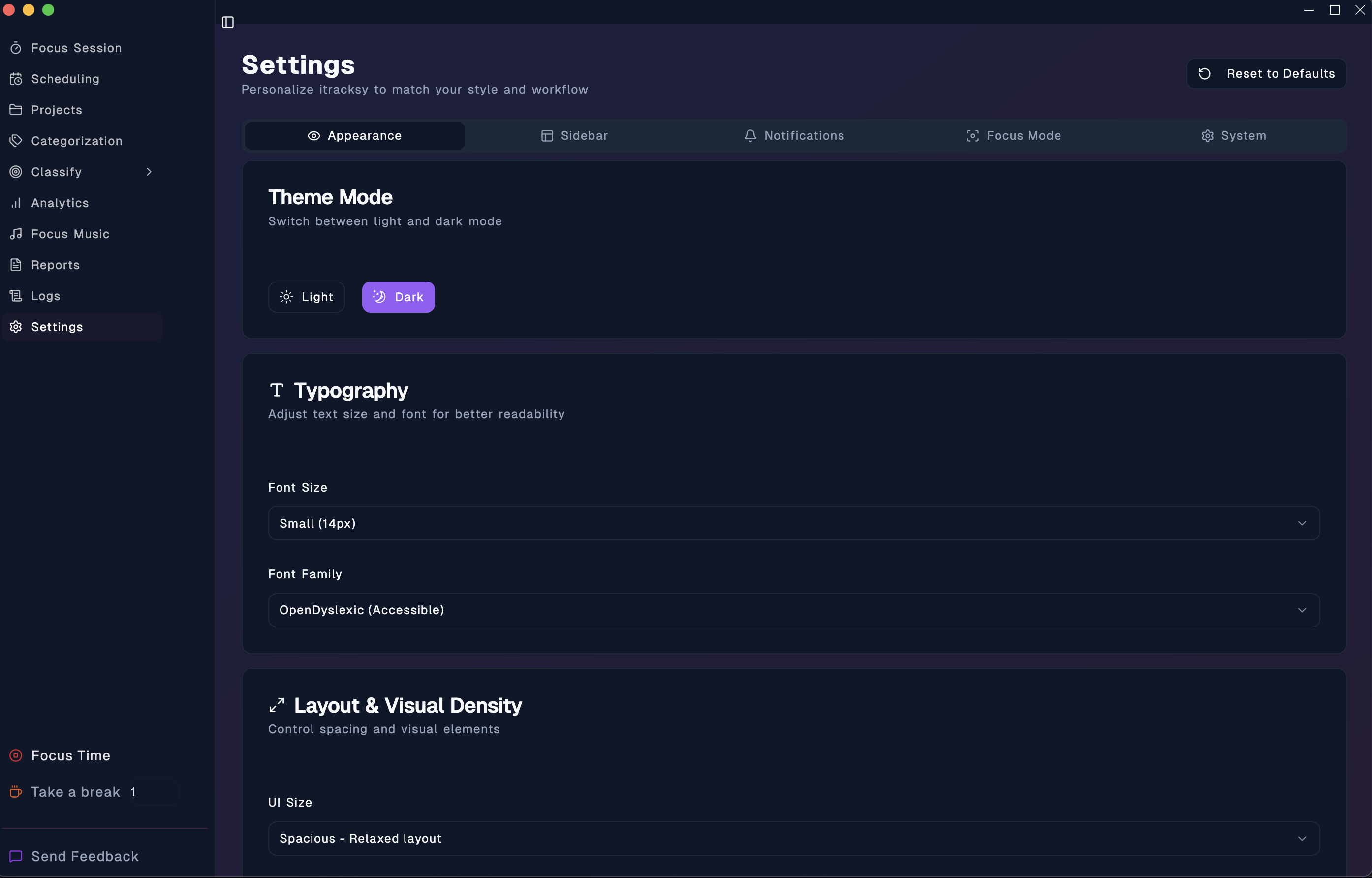 Comprehensive appearance customization with theme, typography, layout, and animation controls
#🎨 Why Customization Matters
Everyone works differently. Some prefer large fonts for comfort during long sessions. Others want a minimal interface to eliminate distractions. Some need accessibility features, while others want vibrant colors for energy.
Your workspace should reflect your needs.
With our new customization system, you can tailor every aspect of iTracksy to match your workflow, preferences, and accessibility requirements.
#✨ What's New
#👁️ Appearance Customization
Take Control of Your Visual Experience
#Theme Mode
Switch seamlessly between light and dark modes. Whether you're working during the day or burning the midnight oil, pick the theme that's easy on your eyes.
#Typography Options
- 4 Font Sizes: Small (14px) to Extra Large (20px)
- 4 Font Families: Default, Sans Serif, Monospace, and OpenDyslexic for accessibility
- Perfect for all ages and visual preferences
#Layout & Visual Density
- Compact Mode: More content, less space - perfect for power users
- Comfortable Mode: Balanced layout (default)
- Spacious Mode: Relaxed layout with breathing room - ideal for extended sessions
- Toggle icons on/off
- Choose rounded or sharp corners
#Animation Control
- None: Instant transitions - zero motion
- Reduced: Minimal animations - accessibility-friendly
- Normal: Standard speed - balanced
- Enhanced: Smooth and fluid - premium feel
- Plus: Reduce Motion toggle for vestibular accessibility
#📋 Sidebar Customization
Show Only What You Need
Hide features you don't use to create a cleaner, more focused workspace:
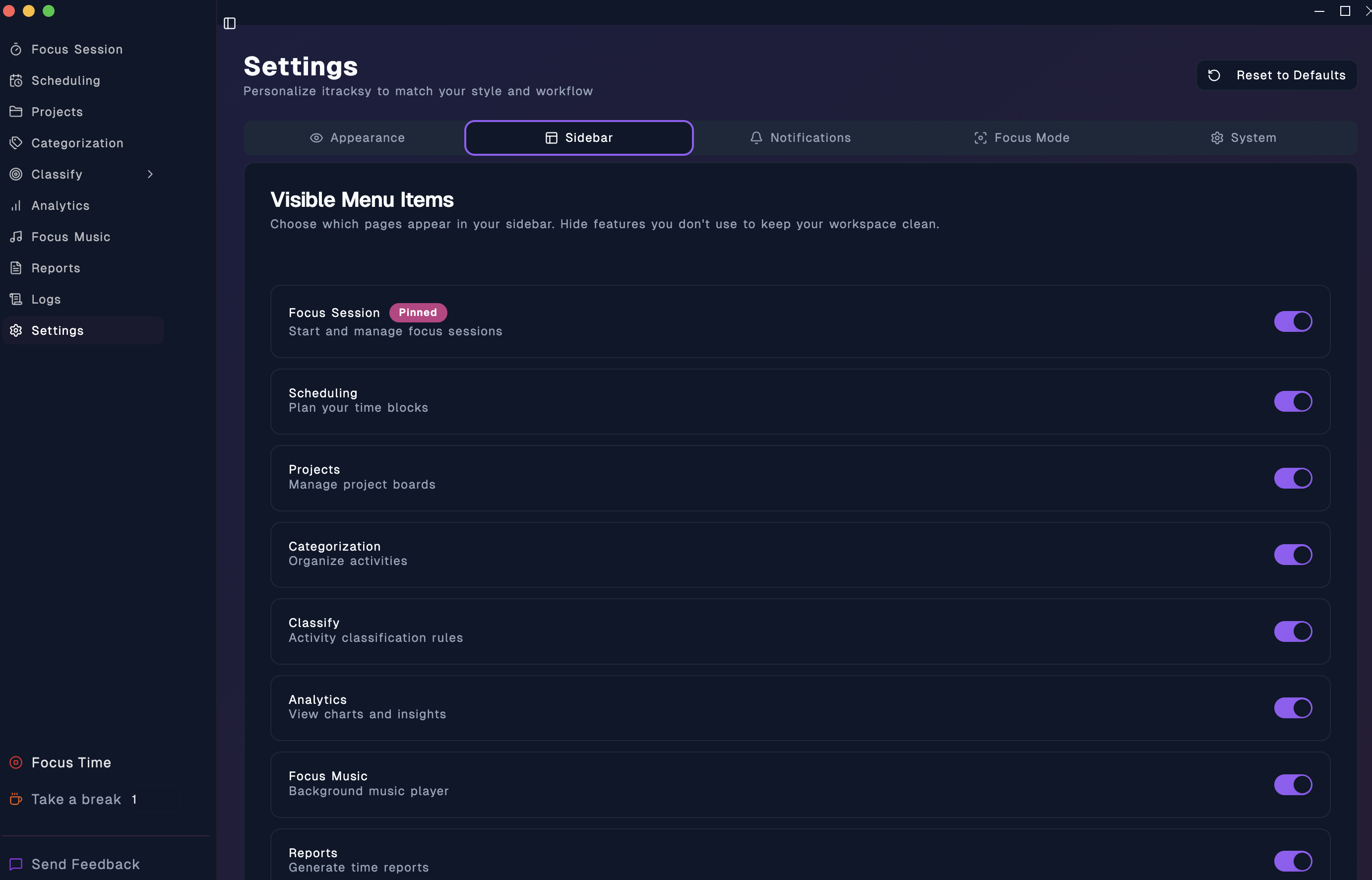 Toggle visibility of sidebar menu items to show only the features you use
- Focus Session
- Scheduling
- Projects
- Categorization
- Classify & Rule Book
- Analytics
- Focus Music
- Reports
- Logs
Settings is always visible (you'll always need access to your preferences!)
Use Cases:
- Student? Hide Reports and Analytics
- Freelancer? Keep everything visible
- Minimalist? Show only Focus Session and Projects
- Your choice, your workspace
#🔔 Notification Preferences
Control What Interrupts You
#Sound Settings
- Enable/disable notification sounds
- Precise volume control (0-100%)
#Notification Types (Toggle Each Independently)
- Desktop notifications
- In-app notifications
- Focus reminders
- Break reminders
- Goal achievements
Strategy Examples:
- Deep Work: Disable all except break reminders
- Motivation Mode: Enable all for maximum engagement
- Silent Mode: Turn everything off
#🎯 Focus Mode Settings
Optimize Your Flow
#Session Warnings & Notifications
- Warning Pop-ups: Alert when accessing blocked sites during focus
- Clock Window: Show floating timer during sessions
- Time Exceeded Notifications: Know when you've passed your target time
#Default Durations
- Set your ideal focus duration (5-120 minutes)
- Set your preferred break length (1-30 minutes)
- Perfect for Pomodoro, Deep Work, or custom techniques
#Session Automation
- Auto-start breaks after focus sessions
- Auto-start next session after breaks
- Fully automated productivity cycles
#Distraction Management
- Dim inactive windows during focus
- Hide non-essential UI elements
- Stay in the zone
#⚙️ System Settings
All System Controls in One Place
- Auto-Start: Launch iTracksy on system boot
- Permissions: Manage macOS accessibility and screen recording
- Advanced Tools: Debug utilities for troubleshooting
- About: Version and app information
#🌟 Real-World Use Cases
#For Students 🎓
✓ Large font for better readability
✓ Hide Reports and Analytics (keep it simple)
✓ Pomodoro timer (25 min focus / 5 min break)
✓ All notifications enabled for motivation
✓ Spacious layout for comfort
#For Professionals 💼
✓ Normal font, professional appearance
✓ Keep Analytics visible
✓ 50-minute focus sessions
✓ Break reminders only
✓ Compact layout for efficiency
#For Accessibility ♿
✓ Extra Large font (20px)
✓ OpenDyslexic font family
✓ Spacious UI with more space
✓ Reduced motion enabled
✓ High contrast for visibility
#For Minimalists 🧘
✓ Hide Music, Reports, and Logs
✓ Small font, compact layout
✓ No animations (instant)
✓ Only essential features visible
✓ Distraction-free focus
#🎯 Key Benefits
#Control & Ownership
You're in charge. Customize every aspect to make iTracksy feel like it was built just for you. When software adapts to your needs, productivity becomes effortless.
#Accessibility First
We're committed to making productivity accessible to everyone:
- Large fonts for vision impairment
- OpenDyslexic font for dyslexia
- Reduced motion for vestibular disorders
- Keyboard-friendly navigation
- Screen reader compatible
#Productivity Optimization
- Hide unused features to reduce cognitive load
- Customize focus durations for your optimal rhythm
- Control notifications to minimize interruptions
- Adjust spacing for your comfort level
#Flexibility Across Environments
- Professional theme at work
- Comfortable settings at home
- Switch anytime, settings persist
- Adapt to any situation
#🏗️ Technical Excellence
#Clean Architecture
Every setting is organized into logical tabs for easy navigation. No more hunting through menus - everything is exactly where you'd expect it.
#Modular Components
Each settings tab is a separate, maintainable component. This means faster updates and new features in the future.
#Type-Safe
100% TypeScript coverage ensures reliability and catches errors before they reach you.
#Instant Apply
Changes take effect immediately - no page refreshes, no loading states. What you see is what you get.
#Persistent
All your preferences are saved automatically and survive app restarts. Set it once, enjoy forever.
#🚀 How to Get Started
- Open iTracksy
- Click Settings in the sidebar (now visible as a menu item!)
- Explore the tabs:
- Appearance: Customize theme, fonts, layout
- Sidebar: Show/hide features
- Notifications: Control sounds and alerts
- Focus Mode: Optimize your workflow
- System: Manage permissions and tools
- Make it yours!
#Quick Tips
Try Different Font Sizes Start with Normal, try Large if you want more comfort. Extra Large is perfect for accessibility needs.
Experiment with UI Size Compact fits more on screen. Spacious reduces visual clutter. Find your sweet spot!
Customize Your Sidebar Hide features you use less than once per week. You can always show them again later.
Optimize Focus Duration Most people find their ideal focus length between 25-50 minutes. Experiment to find yours!
Use Reduce Motion If animations feel distracting or cause discomfort, enable Reduce Motion for instant, smooth transitions.
#💡 Power User Tips
#Theme by Context
- Morning: Default theme for energy
- Work: Professional appearance
- Evening: Comfortable for extended sessions
#Notification Strategy
- Start of day: All notifications for motivation
- Deep work blocks: Only break reminders
- End of day: Goal achievements to celebrate wins
#Sidebar Optimization
Keep your sidebar clean by showing only features you use daily. Monthly features? Hide them and access via search when needed.
#Animation for Focus
Turn off animations during intense work sessions to eliminate visual distractions. Enable enhanced animations when you want a premium, polished feel.
#🎉 The Result
Your Perfect Workspace
No two iTracksy setups need to look the same. Whether you're a student, professional, creative, or anywhere in between - iTracksy adapts to you.
- Young users get vibrant, animated experiences
- Older users get comfortable, accessible interfaces
- Professionals get subtle, distraction-free workspaces
- Everyone gets exactly what they need
#🔄 One-Click Reset
Overwhelmed by choices? No problem! Click "Reset to Defaults" at any time to restore original settings. Experiment freely - you can always go back.
#🎯 What Users Are Saying
"The large font option transformed my experience. I can work for hours without eye strain!" - Sarah K.
"Hiding unused features made my workspace so much cleaner. Love it!" - Mike T.
"OpenDyslexic font makes reading so much easier for me." - Alex R.
"I can finally make my productivity tool work MY way!" - Jordan L.
#📈 What's Next
This is just the beginning! We're already planning exciting additions:
- Custom color themes (coming soon)
- Import/export customization presets
- Time-based theme switching (auto dark mode)
- Per-project customization
- And more based on your feedback!
#🙏 We'd Love Your Feedback
Try the new customization system and let us know what you think! What settings do you love? What would you like to see next?
Your feedback shapes iTracksy's future.
#🚀 Get Started Today
The customization system is available now in the latest version of iTracksy.
- Update to the latest version
- Open Settings
- Start customizing
- Make iTracksy truly yours
Your perfect productivity workspace awaits!
Have questions about customization? Check out our comprehensive documentation or reach out to our support team. We're here to help you create your ideal workspace.
Happy customizing! 🎨