
New Release v1.0.258: Pause Sessions, Color Themes & Enhanced Unlimited Tracking
Introducing manual pause/resume for focus sessions, 7 beautiful color themes, redesigned unlimited focus mode with continuous background tracking, and improved UI.
#New Release v1.0.258: Pause Sessions, Color Themes & Enhanced Unlimited Tracking
We're excited to announce iTracksy v1.0.258 with highly requested features that make your productivity tracking more flexible and personalized than ever!
#What's New
#1. Manual Pause & Resume for Focus Sessions
Finally, you can pause your focus sessions!
We heard your feedback - sometimes you need to step away briefly without ending your entire session. Now you have full control:
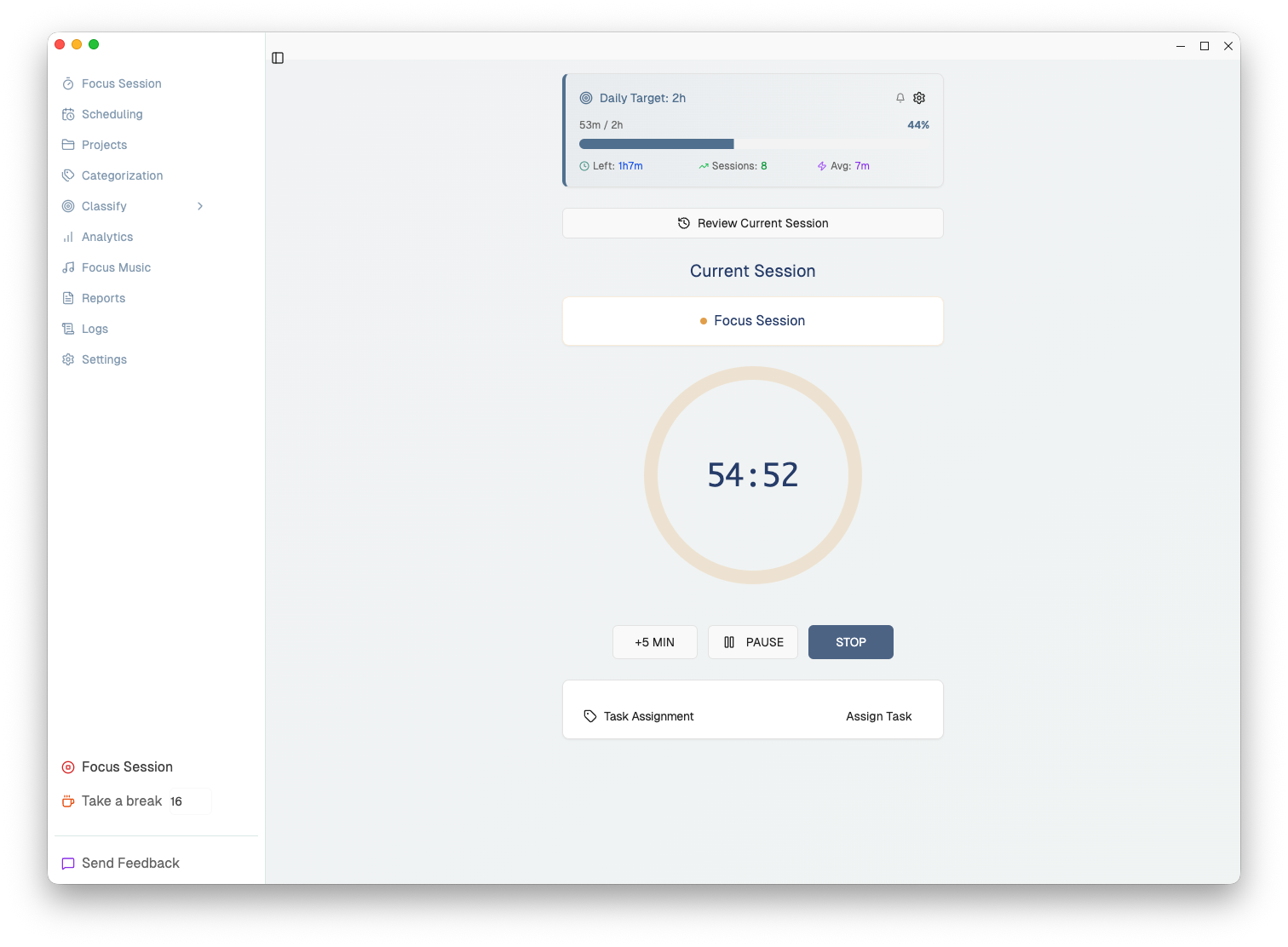 New pause button lets you take breaks without losing your session progress
#How It Works
- PAUSE: Click to pause your session when you need a quick break
- RESUME: Continue right where you left off
- Time Excluded: Paused time is automatically excluded from your session duration
- Visual Indicator: Clear "PAUSED" indicator shows when your session is on hold
#Key Benefits
- Take urgent calls without ending your focus session
- Handle quick interruptions gracefully
- Your productivity stats remain accurate - paused time doesn't count
- Works for both Focus and Break sessions
#2. Redesigned Unlimited Focus Mode
Track your work all day, effortlessly.
We've completely redesigned the Unlimited Focus mode to make it more visible and easier to use:
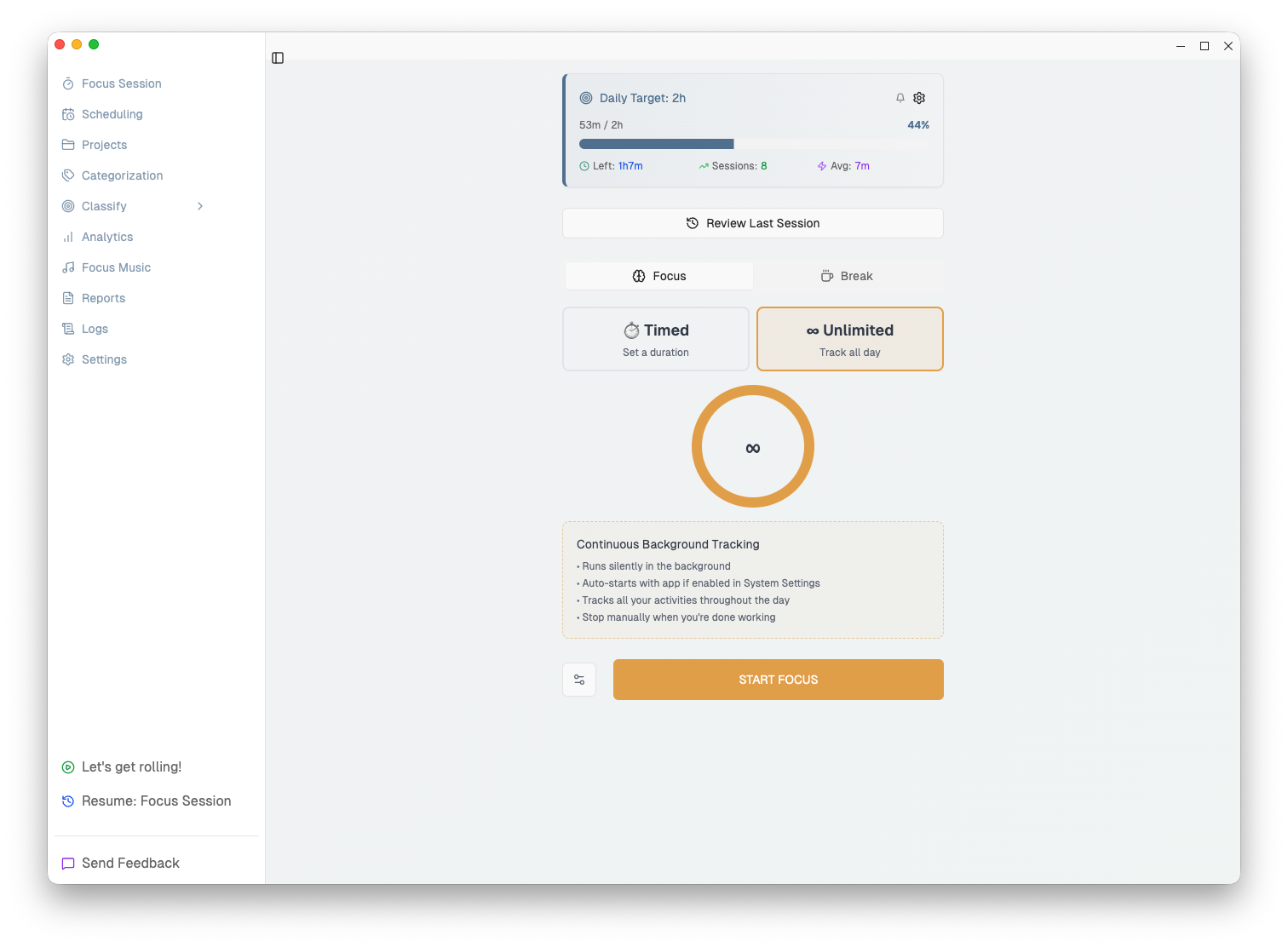 Clear mode selector: Choose between Timed sessions or Unlimited tracking
#New Mode Selector
Instead of a small toggle, you now have two clear options:
- Timed - Set a specific duration for your focus session
- Unlimited - Track continuously throughout the day
#Continuous Background Tracking
When you select Unlimited mode, you'll see a helpful description explaining:
- Runs silently in the background
- Auto-starts with app if enabled in System Settings
- Tracks all your activities throughout the day
- Stop manually when you're done working
Perfect for:
- Remote workers who want to track their entire workday
- Freelancers billing by the hour
- Anyone who wants automatic time tracking without managing sessions
#3. Improved UI & User Experience
#Cleaner Action Buttons
We've streamlined the active session buttons:
- +5 MIN - Extend your session (hidden for unlimited sessions)
- PAUSE - New pause/resume toggle
- STOP - End your session
Removed the redundant CLOCK button for a cleaner interface.
#Break Sessions Update
- Removed "Unlimited" option for breaks (it didn't make sense - breaks should have a duration!)
- More compact, consistent design matching the Focus tab
- Maximum break duration reduced to 1 hour for practicality
#4. Beautiful Color Themes
 Choose from 7 stunning color themes to personalize your workspace
Express yourself with 7 carefully crafted color themes:
| Theme | Description | Best For |
|---|---|---|
| Natural | Calm slate blue - balanced and professional | Focus, Professional work |
| Ocean | Cool blues inspired by calm waters | Deep work, Clarity |
| Forest | Earthy greens for a natural feel | Balance, Wellness |
| Lavender | Soft purple for creative minds | Creative work, Inspiration |
| Sunset | Warm oranges and corals | Energy, Motivation |
| Rose | Soft pinks for a gentle atmosphere | Self-care, Comfort |
| Monochrome | Pure grayscale for minimal distraction | Maximum focus, Simplicity |
#How to Change Your Theme
- Go to Settings > Appearance
- Find the Color Theme section
- Click on any theme to preview it instantly
- Your choice is saved automatically
Each theme shows a color preview so you can see exactly what you're getting before selecting!
#How to Use the New Features
#Pausing a Session
- Start a Focus or Break session
- Click the PAUSE button when you need to step away
- The timer freezes and shows "PAUSED"
- Click RESUME when you're ready to continue
- Your session continues with paused time excluded
#Using Unlimited Focus Mode
- Go to the Focus tab
- Click Unlimited in the mode selector
- Read the description to understand how it works
- Click START FOCUS
- Work as long as you need
- Click STOP when you're done for the day
#Auto-Start Setup
Want iTracksy to track automatically when you start your computer?
- Go to Settings > System
- Enable "Start iTracksy automatically when system boots"
- Combined with Unlimited mode, you'll have automatic all-day tracking!
#Technical Improvements
- New
manualPauseandmanualResumetRPC endpoints - Pause state properly synced with clock window
- System-triggered pauses (sleep/lock) distinguished from manual pauses
- Resume dialog only shows for system pauses, not manual ones
#Update Now
This update is available now! Your app will auto-update, or you can download the latest version from our website.
What's your favorite new feature? Let us know!
Have questions or feedback? We'd love to hear from you. Your input shapes the future of iTracksy!
**Happy focusing! **